
MerlinPDF
A free PDF editor for Windows that does the everyday jobs: fix the text in a PDF, add pictures, rearrange pages, and turn other files into PDFs.
A free PDF editor with no subscription
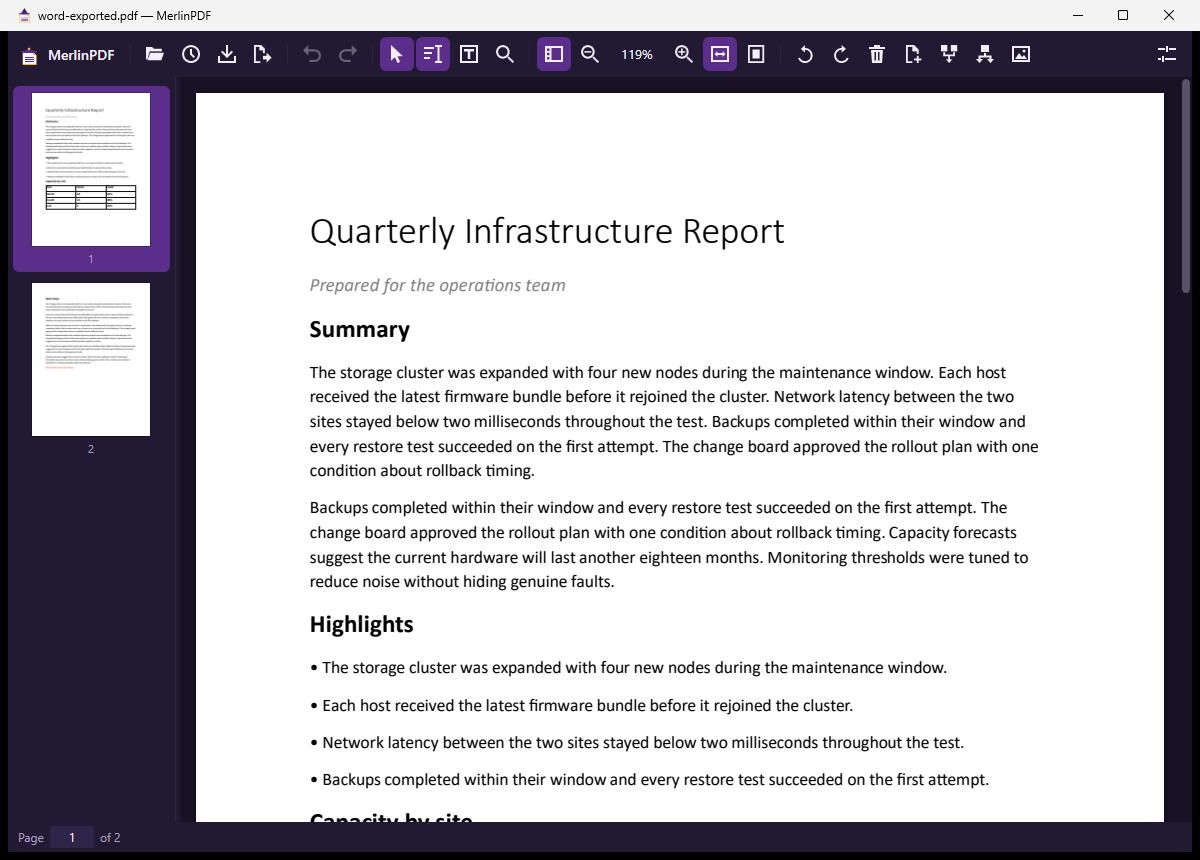
MerlinPDF opens PDF files so you can read them and change them. It covers the jobs most people pay a PDF subscription for, and it's free: no trial period, subscription, account, sign-up or ads.
- Edit the text that's already in a PDF. Click a paragraph, retype it, and it re-wraps inside its original width, in the document's own font wherever possible.
- Add images and text. Drop in a logo, signature image or screenshot, then move, resize or rotate it.
- Rearrange pages. Merge, split, extract, reorder, rotate, delete or insert blank pages.
- Make PDFs from other files. Word, Excel, PowerPoint, images, text files and web pages, one at a time or a whole folder.
- Print to PDF from any program. Setup adds a MerlinPDF printer, and the PDF opens ready to edit.
Is it for you?
It's a good fit if you:
- pay for a PDF subscription mainly to correct text, add an image, or merge and split files;
- need to change a few words in a contract, invoice or report you only have as a PDF;
- turn Office documents, scans or photos into PDFs regularly and want batches done in one go;
- want a tool that runs entirely on your own PC, with nothing uploaded anywhere;
- don't have administrator rights on your PC.
It's probably not for you if you need to fill in or create PDF forms, sign with digital certificates, add comments and highlights, or make scanned pages searchable with OCR. MerlinPDF doesn't do these yet. It also can't edit text in password-protected or edit-restricted PDFs, or in scripts that join or reorder letters, such as Arabic, Hebrew or Hindi.
Features
Editing existing text
- Click any paragraph, heading or line and type. Text re-wraps within the paragraph's width.
- Uses the document's embedded font when it has the letters you typed, otherwise the closest installed font, and the status bar tells you when it substituted.
- Find and replace shows every match with its replacement, and you can untick any you want to leave alone.
- Removed text is really gone from the saved file, not just covered up.
Images and text boxes
- Insert PNG, JPG, BMP, GIF or WebP by button, drag and drop, or paste from the clipboard. MerlinShot captures drop straight in.
- Move, resize, rotate, replace or delete any image, including ones already in the PDF.
- Add text boxes in any installed font, with size, color, bold, italic and alignment.
Pages
- Drag thumbnails to reorder pages, and merge other PDFs in at the exact spot you drop them.
- Split every N pages, by ranges such as
1-3, 7, 9-, or extract the selected pages.
Converting to PDF
- Word, Excel, PowerPoint, OpenDocument, RTF and CSV through Microsoft Office if you have it, otherwise through the free LibreOffice.
- Images one PDF each, or combined into one PDF in the order you choose.
- Whole folders at once, and a Convert to PDF with MerlinPDF entry on the Explorer right-click menu.
Safe by design
- Your original is never overwritten by accident: Save makes a new file, and replacing the original keeps a
.bakcopy. - Unlimited undo, back to when you opened the document.
- Nothing about you or your PC is added to the files it saves.
Price
Free forever. Not a trial, not a beta and not a cut-down version of a paid tier.
Privacy
MerlinPDF works entirely on your PC. It doesn't phone home, check for updates, collect usage data or send anything anywhere. Its logs record file names and timings for troubleshooting, never document contents.
Requirements
| Operating system | Windows 10 version 1809 or later, or Windows 11 (64-bit) |
|---|---|
| Administrator rights | Not needed. It installs for the current user only. |
| Runtimes | None. Everything it needs is included. |
| Internet connection | Not needed, during installation or afterwards |
| Office documents | Microsoft Office or LibreOffice (free) to convert Word, Excel and PowerPoint files |
| Disk space | About 80 MB |
Install
- Download the zip, extract it, and run the setup file inside. Windows will probably show "Windows protected your PC" because the app isn't code-signed yet. Click More info, then Run anyway.
- Choose the extras you want: a desktop shortcut, opening PDF files, the Explorer right-click entry, and the MerlinPDF printer.
- Optionally make MerlinPDF your default PDF app on the last page.
SHA-256 of the setup file inside the zip:
B72618C82555386B41F8BA7CBE74C102B1B122F13AA83E6F0C3C71A0E5474623Uninstall any time from Settings, Apps, Installed apps. That also removes the Explorer entry and the printer.
Known limitations
- Windows only, and not code-signed yet.
- No form filling, digital signatures, comments or OCR yet.
- A paragraph with mixed formatting comes back in its main style on the lines you change, and justified text comes back left-aligned.
- Printing to PDF drops links and bookmarks. For Office files, use Convert instead, which keeps them.
Frequently asked questions
Is MerlinPDF really free?
Yes. MerlinPDF is free forever, with no trial, subscription, account or ads. It isn't part of the beta pricing that applies to the other Merlin apps.
Can I edit the existing text in a PDF for free?
Yes. Click a paragraph and retype it. The text re-wraps within its original width and uses the document's own font where it has the letters you typed. Edit-restricted PDFs are the exception: you can add text and images on top, but not change what's there.
Does it upload my documents anywhere?
No. Everything runs on your PC, and MerlinPDF needs no internet connection at all.
Can I merge and split PDFs offline?
Yes. Merge other PDFs in by dropping them where you want them, split every N pages or by page ranges, and extract selected pages, all offline.
Do I need Microsoft Office to convert Word or Excel files?
You need either Microsoft Office or the free LibreOffice for Word, Excel and PowerPoint files. Images, text files and web pages convert without either.
Do I need administrator rights to install it?
No. MerlinPDF installs for the current user only. If Windows' print log is switched off, adding the MerlinPDF printer asks once to switch it on; you can say no and everything else still works.
Can it fill in forms or make scanned pages searchable?
Not yet. Form filling, digital signatures, comments and OCR aren't in the current version.
Need a tool built for your team?
We build Windows software for the jobs off-the-shelf tools don't cover. No sales pressure, just technical clarity.